
Link work packages
Links make dependencies between work packages visible and clarify sequencing, responsibilities, and collaboration.
Links between work packages help you visualize dependencies within a component and ensure that your team understands the order in which tasks must be completed. This creates a clear, traceable project flow that makes collaboration easier.
The building blocks of project components
How it works
In Leadtime, you can link work packages directly—for example, when one work package cannot begin until another has been completed. Links are added through the Description or Internal Note of a work package.
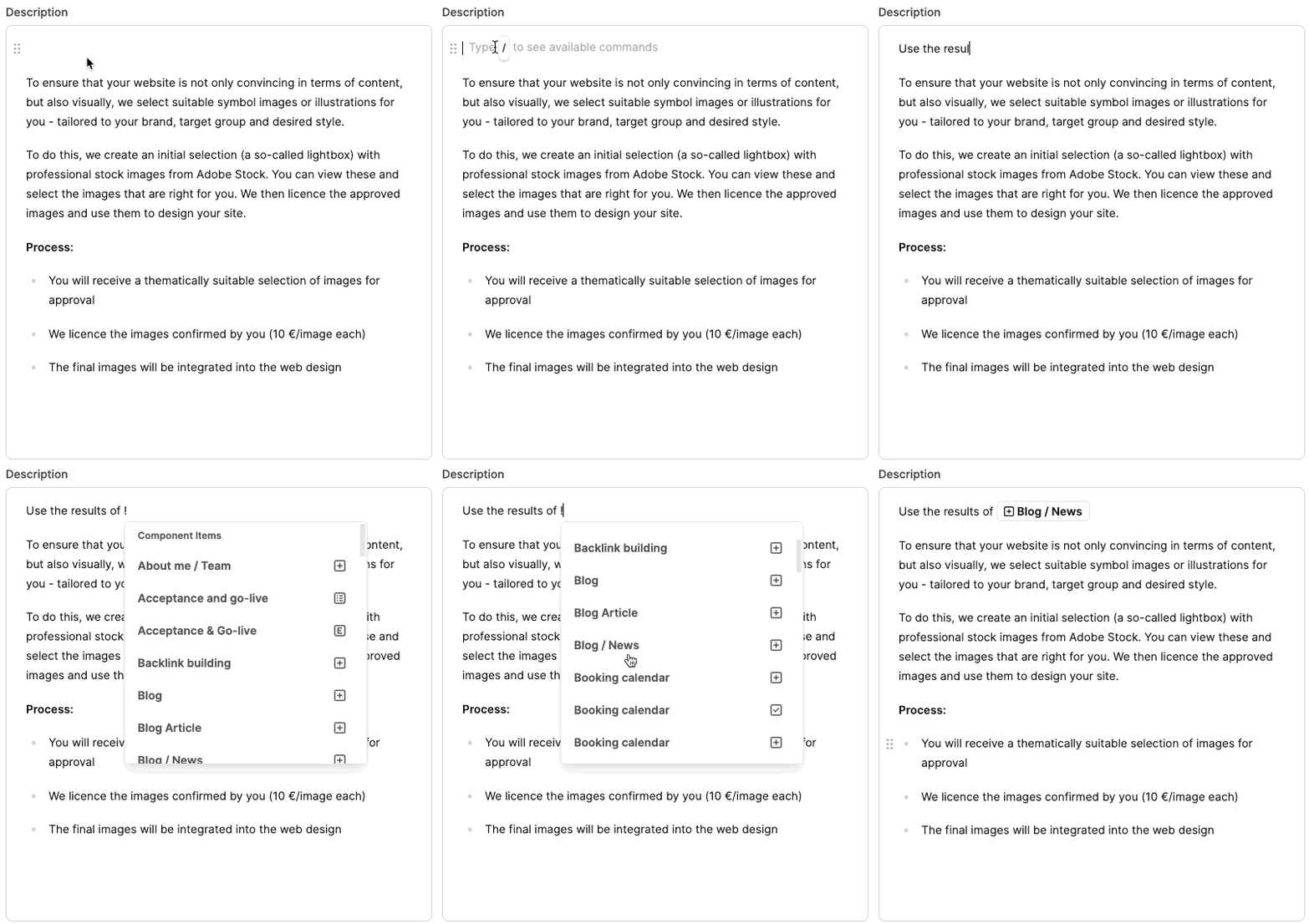
To add a link:
- Open the Component Library.
- Edit the work package that should reference another work package.
- Click the Description field.
- Type ! or select “Component Item” from the Slash menu.
- Find the work package you need (for example, “Create content”) and insert the link.
Leadtime automatically creates an internal link that is carried over when the component is used in projects.
Effect in the project
When a project is created, the links are automatically carried over to the ticket descriptions. This lets your employees see immediately:
- which tasks must be prepared,
- which results are required,
- and the order in which the work should be completed.
Best practices
- Add a link whenever the result of one task is required for a subsequent task.
- Use unambiguous work package names so they are easy to find when adding links.
- State clearly which results should be used (for example, copy, wireframes, or layouts).