
Benefits of a ticket-based workflow
Without a ticket system, everyday business turns into chaos. Leadtime makes work visible, plannable, and documented – with built-in structure, time tracking, and stacks for focused, interruption-free work.
This article explains how workflows, efficiency and transparency change in a digital service company when tasks are consistently organized through tickets.
You’ll find ticketing in Leadtime wherever tasks are created, planned or documented.
All about tickets: Projects – Task Tab (Ticket System)
Starting point: Working without a ticket system

A lot of digital service companies start out with a pretty informal way of working.
Tasks just pop up, get discussed in meetings, shared in messenger or forwarded by email.
Day-to-day works fine when the team is small – but as project numbers grow, you start to face typical problems:
- Scattered information: Important details are in emails, chat histories, or notes. It’s unclear where the current status of a task is documented.
- Dependency on individuals: Only the person who last worked on a topic knows the context. If they’re out or on vacation, the project stalls.
- Lack of transparency: Managers rarely know exactly what the specialists are currently working on or how far a task has actually progressed.
- Constant interruptions: Questions and coordination happen over messenger, often without structure. Specialists lose focus because they’re always waiting on feedback.
- No overview of effort and progress: Since tasks and time aren’t tracked systematically, it’s unclear how much work has already gone in — or whether projects are actually running profitably.
As long as there are only a few projects running in parallel, you can handle it.
But as soon as there are several clients, deadlines and team members involved, chaos in slow motion happens:
Work gets done twice, deadlines get missed, and important topics disappear between messages and meetings.
The turning point: introducing a ticket system
A ticket system changes how a company works – moving from a communication-driven culture to a structure-driven way of working.
It makes work visible, plannable, and easy to document.
Visibility
Every task is logged as a ticket – with title, description, person responsible, status, and deadline.
That way everyone gets a shared overview of all ongoing topics:
Who’s working on what? What’s done? What’s blocked?
Instead of waiting for follow-up questions, everyone involved can check the status themselves at any time.
Structured collaboration
A ticket system doesn’t replace dialogue, it just moves it to the right place.
Discussions, decisions, and progress all happen right inside the ticket.
This way, information is stored permanently, so it’s always traceable later.
Unnecessary interruptions are avoided, because experts can work undisturbed while others add new tickets or check existing ones at the same time.
Documentation and knowledge transfer
Every ticket represents a complete process – with a full history.
Over months and years, this creates a central knowledge base, archiving all tasks, decisions and solutions.
New team members can get up to speed faster, customer questions are easy to answer, and already-solved problems don’t have to be re-analyzed.
Management and control
Combining tickets and time tracking gives you an accurate real-time view:
- How much work is in which project?
- Which tasks are overdue?
- Who is overloaded?
Management gets an objective, data-driven control tool – instead of relying on estimates and gut feeling.
What’s special about the Leadtime ticket system
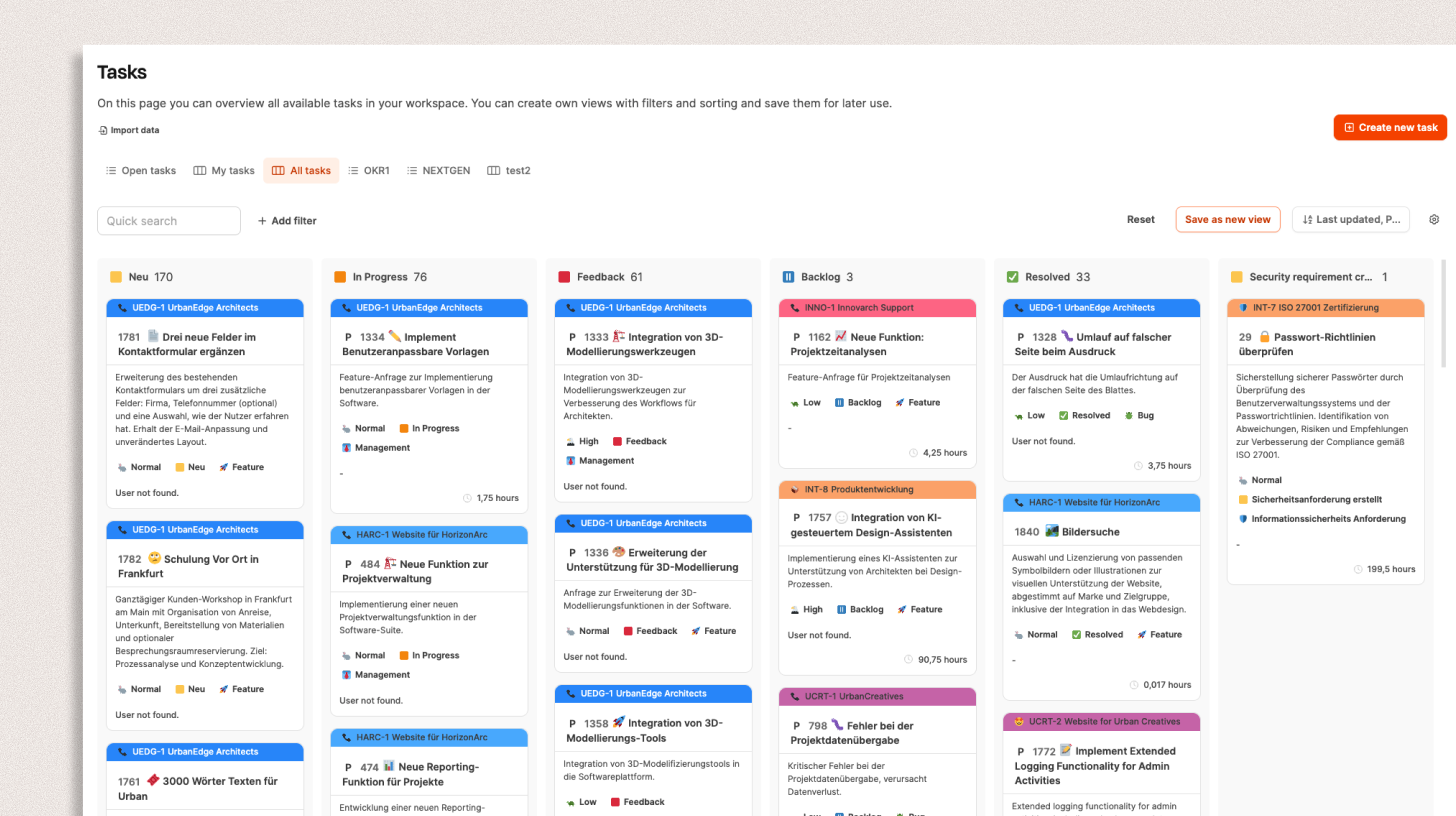
A lot of tools offer ticketing—but in Leadtime it’s not an add-on, it’s the core principle of the entire system.
All workspaces—from client projects to internal processes—are based on tasks (tickets) that move smoothly through the whole workflow.
Consistent structure for all teams
Leadtime is built on a central principle: Everything is a project, every task is a ticket.
Whether it’s support, sales, or development—the work is organized the same way.
That means everything is comparable, clearer, and responsibility is consistent across teams.
Real-time transparency and time tracking
Team members can log their work hours right to tickets.
So at any time, you can see who’s working on what and how much time has been spent.
This creates predictability and enables exact evaluations of effort, profitability, and progress.
Via Time tracking
Focus on maximum throughput
Leadtime is designed to optimize the global workflow throughout the entire company.
The goal isn’t just to manage tasks – it’s to make sure that every expert is always working on the most valuable task.
Several planning levels interlock for this:
- Big Picture: sets the long-term priorities across all projects.
- Pipeline: defines which tasks are next to make the biggest impact on progress.
- Stacks: automatically transfer those priorities to the individual work scope of each expert.
This creates a dynamic, self-regulating system focused on maximum throughput and minimum downtime.
Every team member always knows exactly what to work on next—aligned with the company’s goals and without constant check-ins or questions.
The result is an even, predictable flow of work across all projects—with top efficiency and minimal need for coordination.
The planning tools: Planning
Automatic context info
Every ticket gets enriched automatically with project data, time logs, comments, and metadata.
This way, the whole history stays traceable—from when a task is created to when it’s billed.
AI-powered support
Leadtime offers built-in AI features that help you create, organize, and write tickets.
This creates clear, complete task descriptions that cut down on questions and speed up the workflow.
More about the AI Text Assistant
Conclusion
A company that works without a ticket system will inevitably lose oversight, efficiency and knowledge as it grows.
A systematic, ticket-based workflow brings order, transparency and continuity.
With Leadtime, this structure isn’t just implemented but smartly enhanced:
with automatic prioritization, real-time data and context-sensitive support.
The result is a work environment where teams can work independently and focused – without information loss, waiting times or constant check-ins.
Everything about tickets: Projects – Tasks tab (ticket system)