
Documents Tab (Single Projects Only)
The documents section creates, versions, and exports project-related quotes, specifications, and contract documents based on dynamic templates.
The “Documents” tab under Projects → [Select project] → Documentsis used to create, manage, and version project-specific documents in a structured way. The previously configured content of a single project is automatically used to create proposal documents, specification sheets, as well as freely designed contract or supporting documents. The documents are either based on predefined system modules or on admin-maintained templates, which can include variables, dynamic conditions, and customizable heading structures. This way, the section lets you generate consistent, traceable, and repeatable documents for both internal use and customers.
All about projects
Advantages
The documents section offers:
- Reusable templates with modular variables
- Clear assignment to project versions
- Automated text fill-in from system data
- Dynamic show/hide of sections
- Exportable and editable DOCX files
- Process clarity for estimates and requirement specs
Overview of document types
Estimates (Estimates)
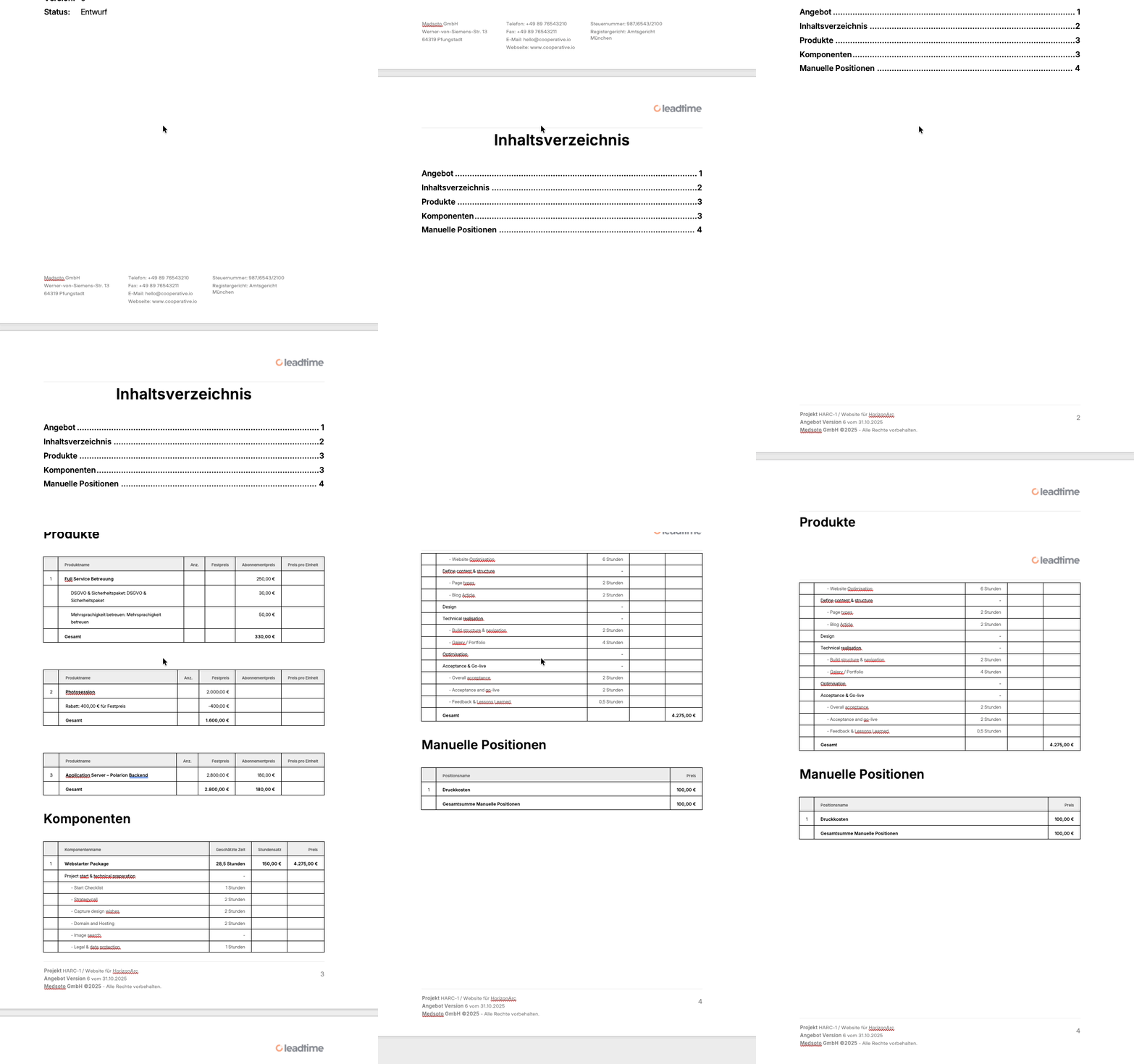
Estimates summarize the configured services of a project, keep track of quantities, discounts and one-time as well as recurring costs. They’re used for the commercial check-in with the customer, have status indicators (like draft, for review, accepted, rejected) and can be exported or archived as needed.
Specifications
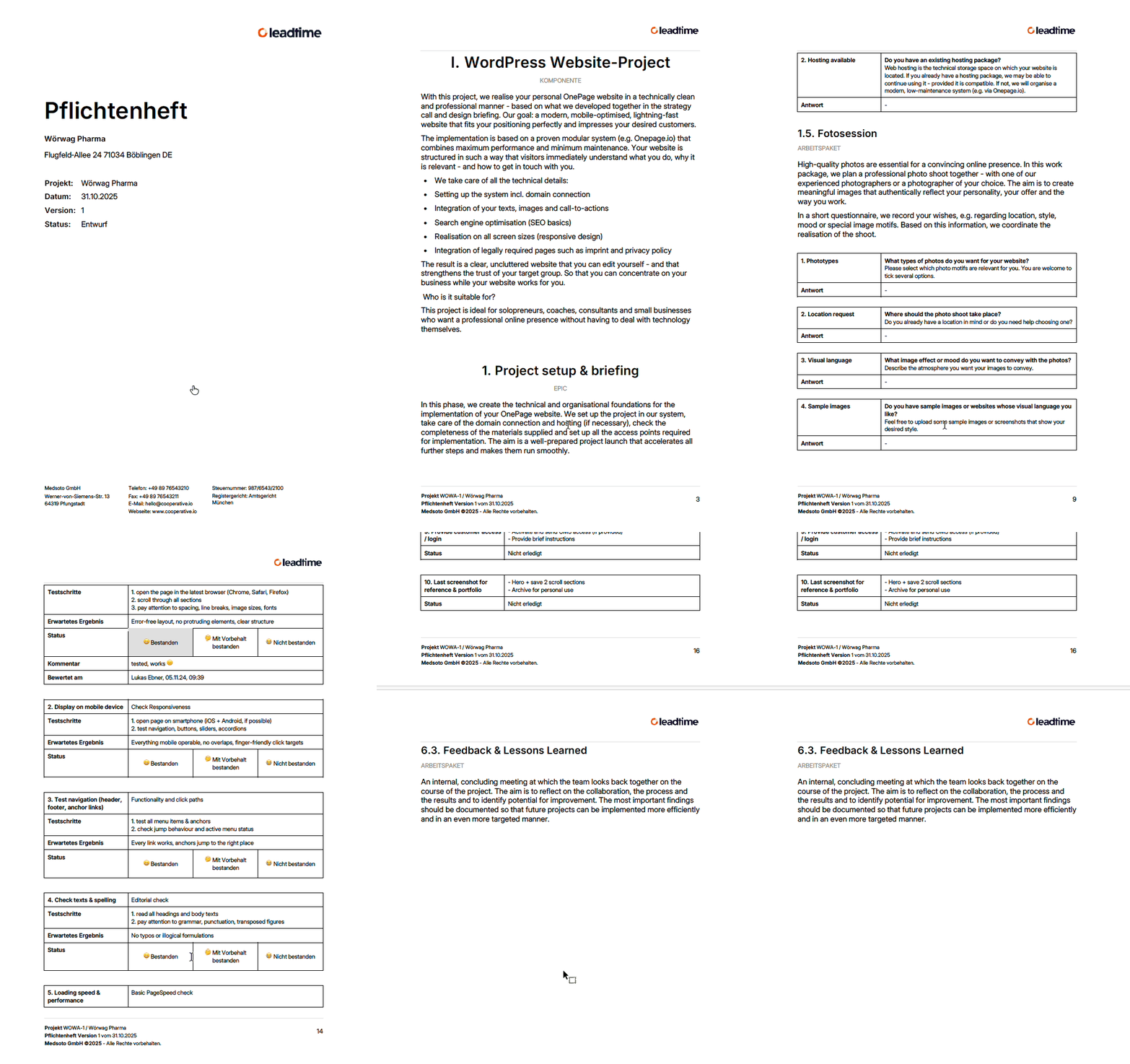
The specification document serves several important purposes:
- Detailed requirements: The specification document describes precisely all the requirements that the product or system to be developed must meet – including functional aspects, performance features, design specifications and lots of other details.
- Means of communication: It makes sure that all stakeholders – including clients, developers and project managers – are on the same page with information.
- Contract basis: The specification document serves as the binding basis for the contract between client and service provider. The services described in it are clearly and thoroughly defined.
- Quality control and acceptance: By comparing what was actually built with the agreed requirements, you can objectively check if the project was finished successfully.
In short: The specification document is an essential part of any project – it helps define, plan, implement and control the whole thing.
The problem: Creating a specification document is a lot of work
Actually, the service provider can really only make a reliable estimate of a project’s actual effort once the specification document has been finalized. Only this document provides the level of detail needed to make solid statements about scope, required time, and costs. In an ideal world, the client would therefore just order the creation of the spec first—and play an active part in clarifying any open questions. Based on this, the provider could then give a solid quote and a realistic timeline. The problem: In practice, a lot of clients expect at least a somewhat reliable offer way earlier. Often, that’s actually needed before they’ll even dig deeper into talking with the provider about the project.
For the service provider, that means a big risk: They have to guesstimate—hoping that their estimates are realistic even though info is missing, and the buffers they’ve planned are enough. If the effort gets underestimated, they’re on the hook for the extra costs—worst case, they’re eating the loss.
Leadtime tackles exactly this problem:
- It speeds up and simplifies gathering requirements through dynamic questionnaires in project components.
- Creating the specification document gets a lot more efficient: With templated texts and a systematic question catalog, you can put together a spec right after the client meeting.
- The resulting specs clearly show where requirements still need to be clarified.
- Thanks to AI integration, requirements that have been gathered once get reused multiple times—first for the spec to coordinate with the client, then as the foundation for concrete tasks the team can jump into.
Free Documents (Custom Editor)
The free editor lets you create individual documents like project contracts, privacy notices, data processing agreements, or accompanying documentation. You can import templates from the administrative document library for this purpose. These often have variables, conditions, and sections that show up for customer-specific scenarios.
Document templates are managed here: Document templates
Examples of free documents
- Contracts
- NDAs
- Privacy agreements
- Price lists
These documents are based on templates and automatically pull in relevant variables from the project, organization, or customer profile. That way, you get correct, formatted documents with up-to-date data in just a few clicks.
Document status management
The status of a document is for internal tracking. Examples:
- Draft (Entwurf)
- Waiting for Approval (beim Kunden zur Prüfung)
- Final (fertig zur Unterzeichnung)
- Declined (abgelehnt)
In the list view you can instantly see which version is at what review stage.
Version binding and traceability
Everything about project versions: Version management
Since projects have versions, documents stay linked to one config version for sure. This makes sure:
- Audit security
- Comparability
- Legal traceability
Important: If there’s no saved project version, you can’t create documents.
List view in the Documents tab
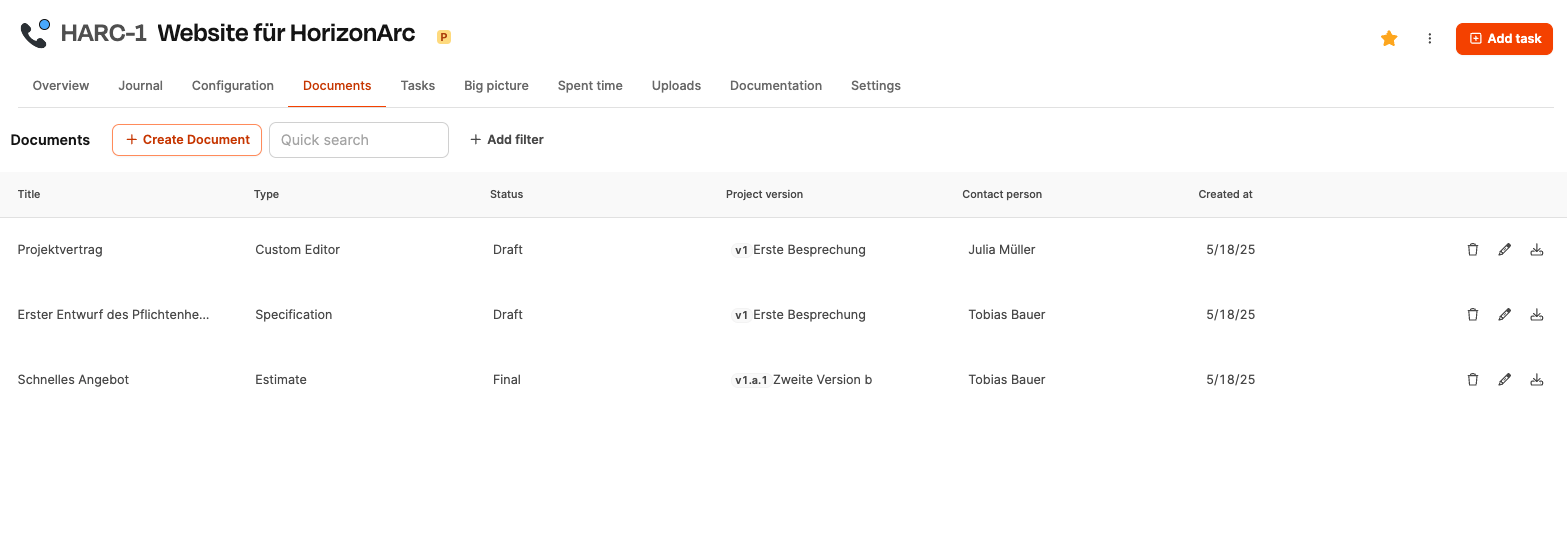
The table overview shows:
- Title
- Document type
- Status
- Related project version
- Contact person
- Creation date
You can open, download or delete documents using the icon.
Workflow for Creating a Document
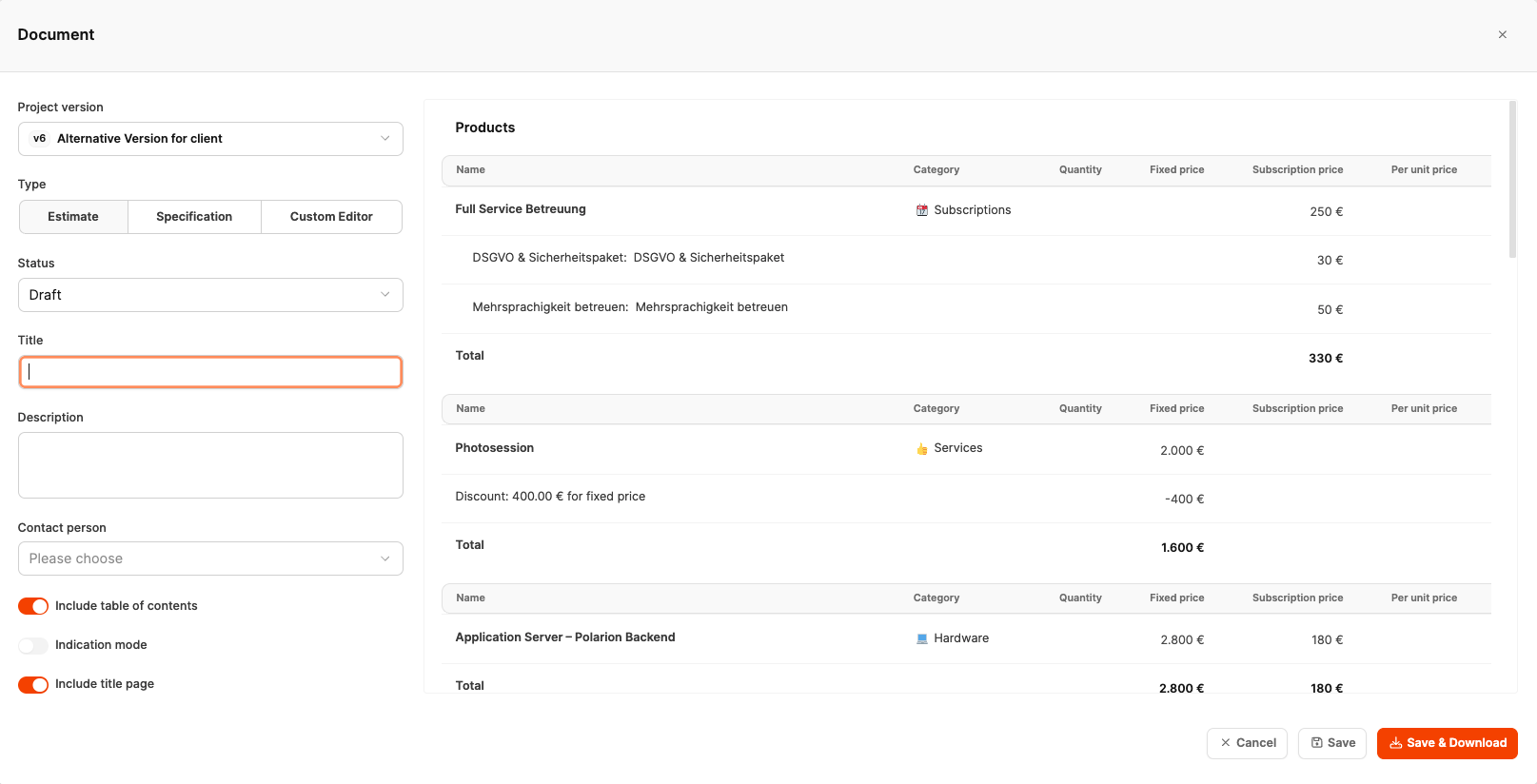
When you click on “Create Document”, a dialog will open where you set up the new document. The process usually goes like this:
-
Selecting a project version
Documents are always tied to a specific project version. This way, their content stays historically traceable.
-
Choosing the document type
Offer, specification, or custom editor.
-
Assigning key properties
Title, description, and status describe the context info.
-
Picking a contact person
This person will show up as the addressed contact in the document.
-
Layout options
- Enable table of contents
- Show title page
- Mark indication mode (mark as non-binding cost estimate)
-
Choosing the heading style
Numbered headings support contract logic and are dynamic, so any hidden sections are numbered correctly.
-
Saving or Download
Documents can be:
- saved (internal storage)
- saved and exported as DOCX
Document structure and display
The left side of the dialog controls structure and meta information, while the right side shows the actual document content. For quotes and specifications, an overview of relevant project products and positions will also show up on the right, so you can instantly see the business context.
Working with templates and variables
Document templates are managed here: Document templates
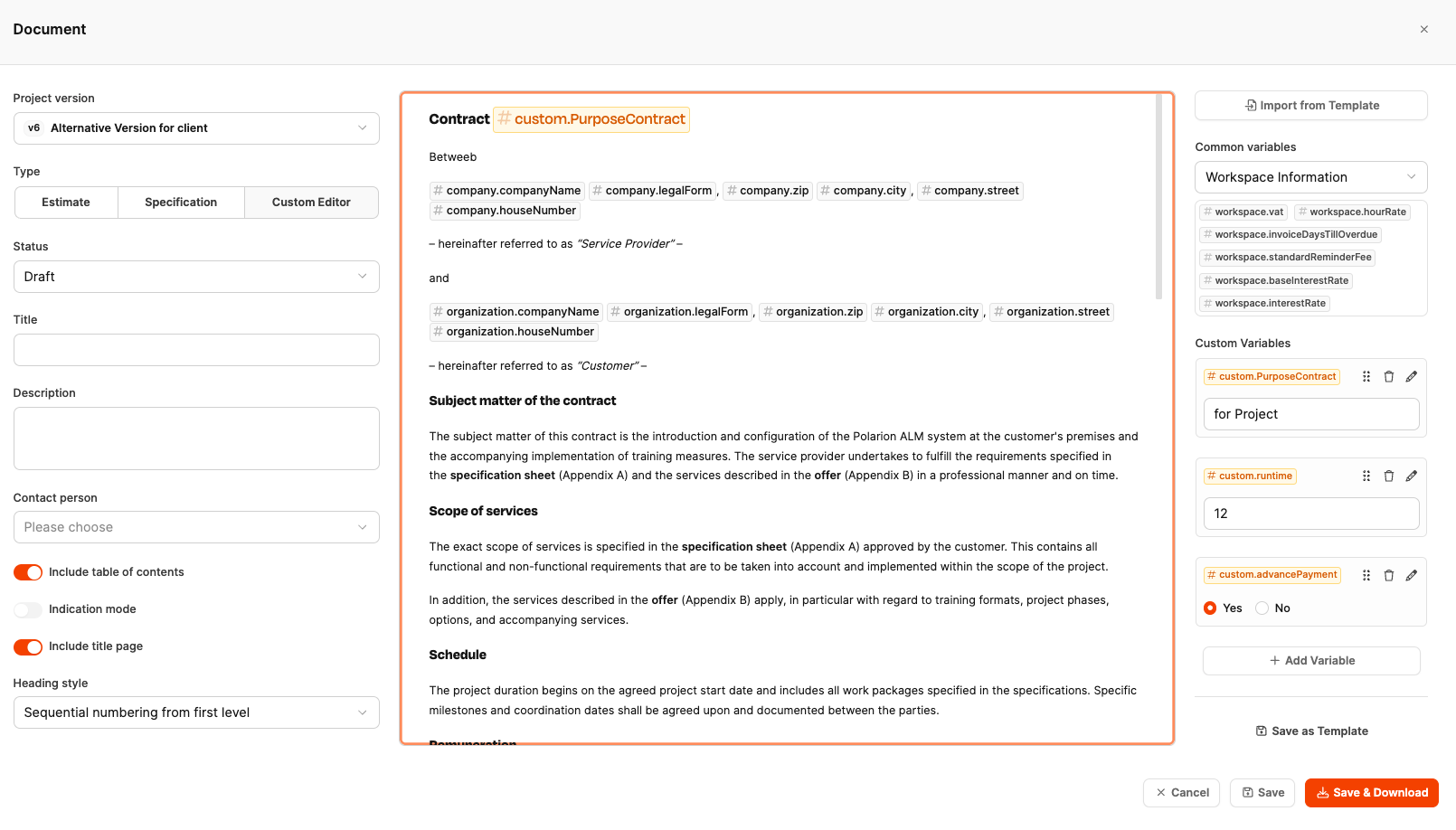
You can import document templates in the Custom Editor. Templates support two types of variables:
- System variables Automatically fill in, e.g. company name, address, legal form, or globally defined rates. This way, every document is always up to date with the stored organization.
- Custom variables Values that are set by the user once when creating the document (e.g. duration, payment model, extension options). These variables show up as form fields in the editor and will be replaced automatically in the document.
Conditional content blocks
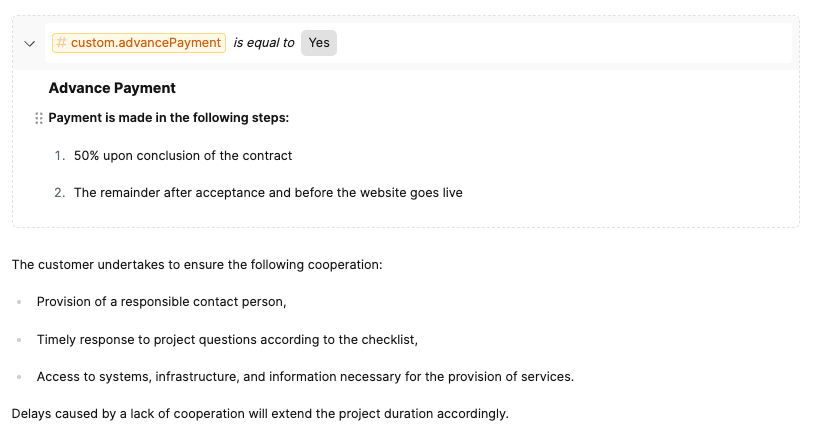
Templates can have sections that only show up when a defined variable matches a certain condition. Examples:
- Advance payment rule only if the “Advance Payment” variable is enabled
- Liability section only for hosting projects
- Support agreement depends on duration
This lets you create modular contracts without any manual deleting.
Dynamic numbering
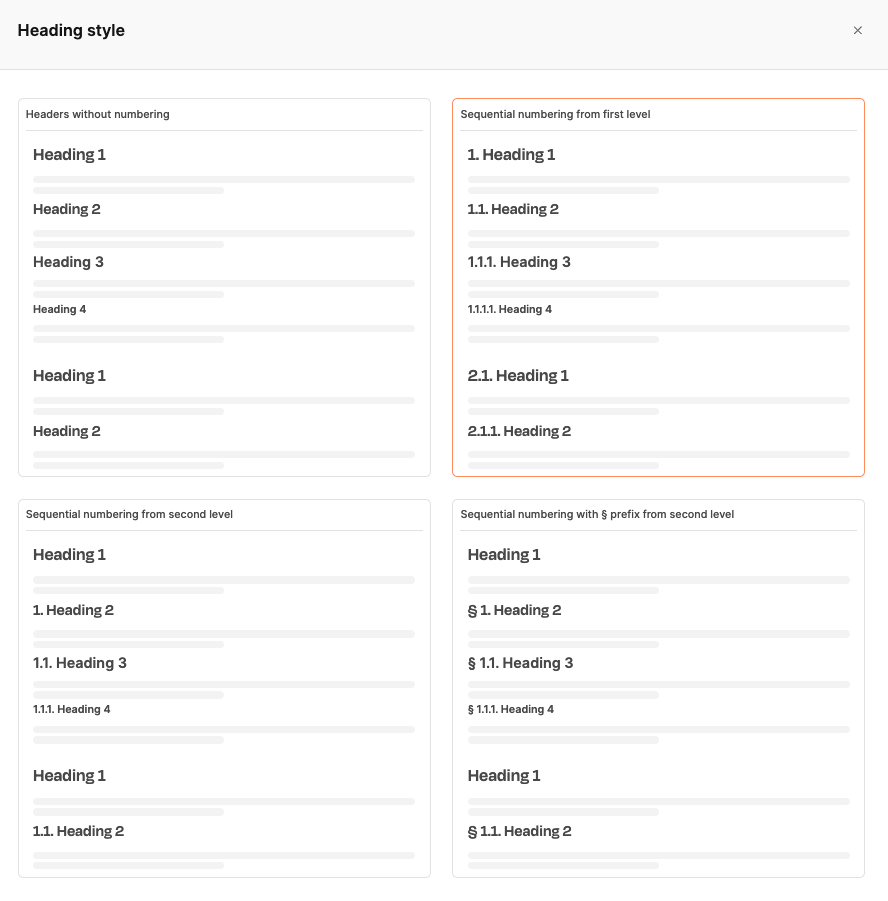
So that collapsible sections don’t cause numbering gaps, outline levels are calculated dynamically and continuously. You can pick from:
- unnumbered headings
- sequential numbering from level 1
- sequential numbering from level 2
- § numbering from level 2
This is especially helpful for legally structured contracts.
Everything about projects