
General Billing Settings
Defines basic rules, recipients and project versions for billing a project in Leadtime.
This area is located in Projects → [Select project] → Settings → General billing settings. Here you configure how invoices are generated for the selected project. This includes mixed or separate invoices, the default recipient, billing for bug tasks, and the selection of project versions that serve as the basis for invoicing.
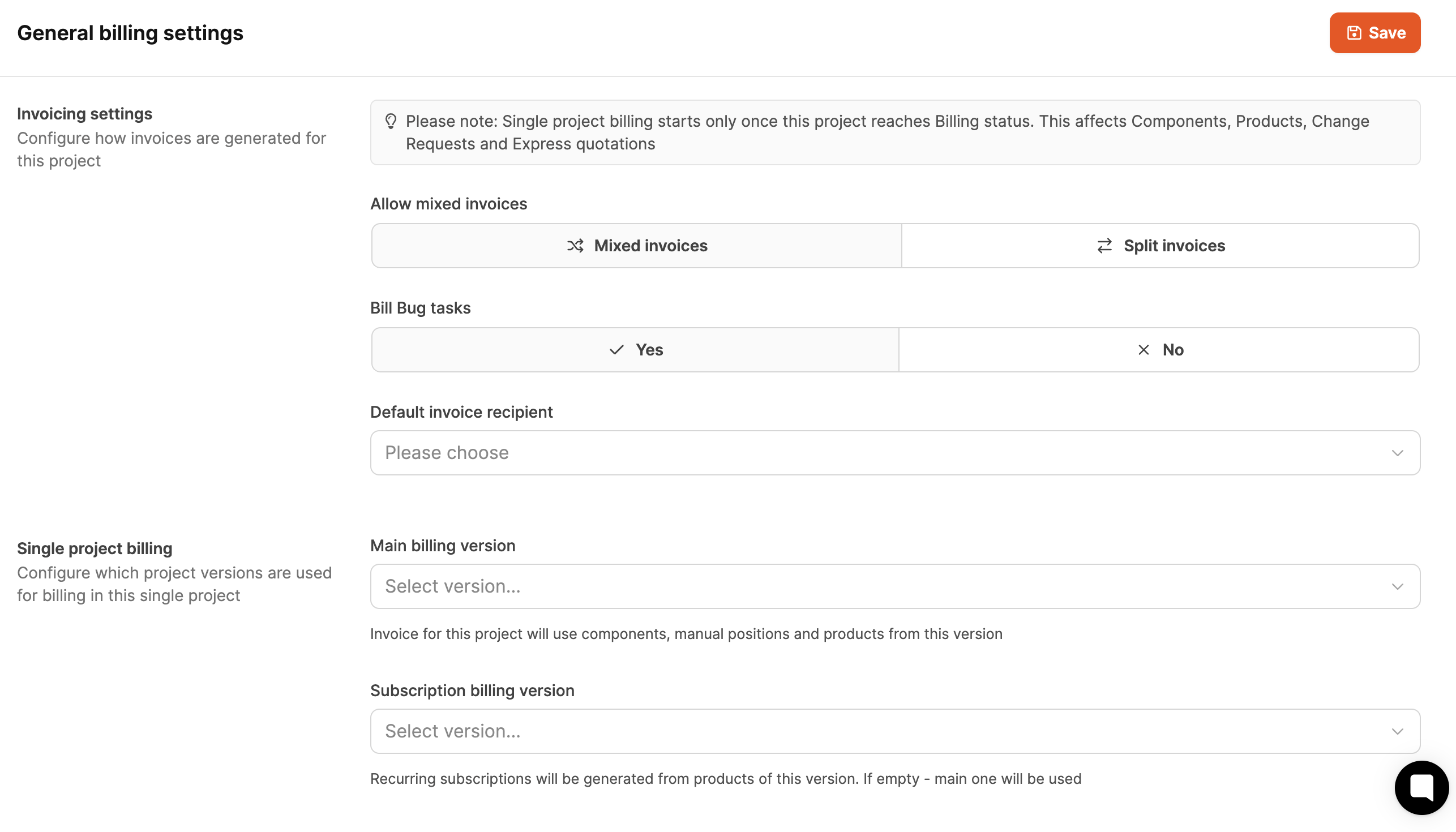
The settings are divided into several sections and influence which data goes into invoices and how they are structured.
The workspace-wide billing settings are made here:
Billing
Billing settings
Mixed bills

Mixed bills: This allows support expenses (according to booked hours) to be billed in a joint invoice with subscriptions.
Split bills: Support invoices are generated separately.
Overview of the billing system
Billing bug tasks

Determines whether time spent on tasks with activity “Bug” can be billed.
Default invoice recipient

- Selection of a contact person from the customer organization.
- This person is automatically preset when creating invoices, but can be overwritten.
Main billing version
Project versioning is used when configuring individual projects. The offers presented to the customer for a project are based on these project versions. This dropdown determines which of the versions the customer should ultimately be billed for.

- Selection of the project version that will be used as the basis for billing.
- Includes components, manual items and products as agreed.
About that Version management
Subscription billing version

- Optionally selectable if the project contains recurring payment products.
- Used to bill subscriptions regardless of project scope.
- If the field remains empty, the main version is automatically used.
About that Version management
Support quotas (retainers)
[!WARNING] Support quotas only appear in ongoing projects
You can find support quotas within a project at Settings > General billing settings.
With support quotas, monthly hourly packages can be deposited at a fixed price.
They are suitable for recurring support, maintenance or services and are automatically suggested during invoice verification.
Optionally, unused hours can be carried over to subsequent months.
About the Working with retainers
How it works
Support quotas are configured per project and automatically affect monthly billing. After activation, the stored values serve as the basis for comparison and overtime calculations.
Visible fields in the area Support contingents:
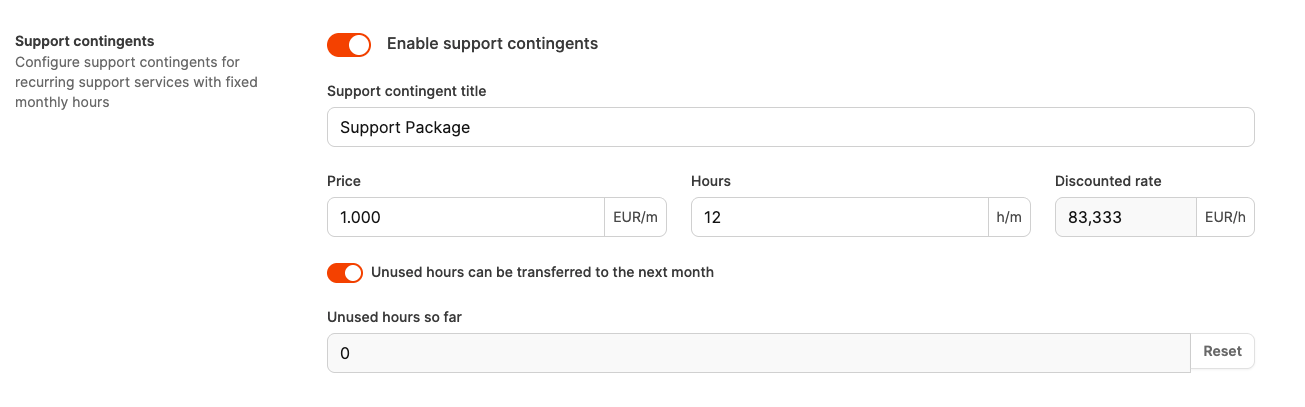
-
Enable support contingents
Activates the hour package for this project.
-
Support contingent title
Name for the package (e.g. “Support Package”). Appears later in the invoice.
-
Price (EUR/m)
Monthly fixed price for the quota.
-
Hours (h/m)
Number of support hours included per month.
-
Discounted rate (EUR/h)
Reduced comparative hourly rate for calculating overtime.
-
Unused hours can be transferred to the next month
Option to carry unused hours into the following month.
-
Unused hours so far
Shows accumulated remaining hours if carryover is allowed. Can about Reset be reset.
The following cases arise in the billing:
- Become more Hours consumed than included, overtime will be charged at the normal hourly rate.
- Become less Hours consumed and no carryover is activated, remaining hours expire.
- At activated carry Remaining hours are saved and billed in the following month.