
Estimate working time
Compares estimated and booked time, shows progress, and warns if workload or deadline is exceeded.
The Timeframe section in a ticket shows the comparison between planned (estimated) and actually tracked working time. This helps you realistically assess the progress of a task and spot early on if the effort is still on track or already exceeded. The estimate feature helps teams plan tasks better and distribute workloads in a smart way.
How it works
Add an estimate
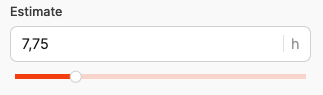
When creating or editing a ticket, you can enter the expected time in hours in the Estimate field.
- You can enter a value manually or adjust it using the slider.
- You can change your estimates anytime later, for example, if the workload changes.
- The estimate is the base for the progress display in Timeframe.
Example:
Estimate: 7.75 h – the employee plans about 7 hours and 45 minutes of work time.
Log time to tasks:
Time tracking and comparison
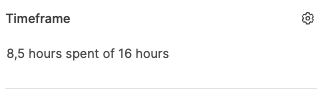
All logged hours on the ticket are automatically compared with the estimate. The comparison is shown as “hours logged of estimated hours”, e.g. 8.5 hours spent of 16 hours.
Big Picture
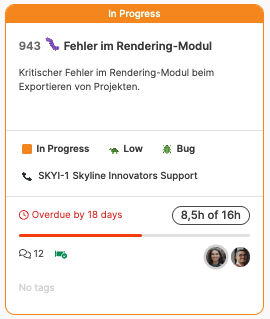
A progress bar shows the current status:

- Gray: Within estimate

- Red: Estimate exceeded
These details show up right away in the ticket card and in the big picture view, like 8.5h of 16h.
To Big Picture
Notifications for going over estimate
As soon as the logged hours go over the estimate, these things happen:
- Progress bars marked in red,
- and all participants who subscribed to the ticket are notified about the change.
Participants can sign up for updates in the Notifications section using the Subscribe button.
About notifications: Messaging system
Best Practices
- Split tasks into manageable chunks (max. 1–2 days of work).
- When you change the task description, adjust the estimate to keep things transparent.
- Regularly check the alignment between estimates and actual effort in the weekly or pipeline review.