
Guest User
Guest users offer a safe and simple way to include external people in selected projects while keeping internal workspace data private.
Guest users give external people, such as customers or partners, secure access to their own projects in Leadtime. Clearly restricted permissions protect internal data while keeping collaboration with external participants efficient and transparent.
[!SUCCESS] Guest access is generally free of charge and does not incur additional license fees.
Benefits of guest users
-
Transparent collaboration
External people, such as customers, can participate directly in projects, view tasks, or provide feedback without needing separate communication channels.
-
Time savings
Project status is always transparent. Customers can check the current status themselves, eliminating questions about progress or tasks.
-
Data security
Guest users see only projects assigned to their organization. All other data remains hidden, preserving the confidentiality of internal processes.
Invite a guest user
1. Create a member in an organization
- Navigate to Organizations.
- Select the relevant organization.
- Open the Members tab and click Add member.
- Enter the contact’s basic details (name, position, email address).
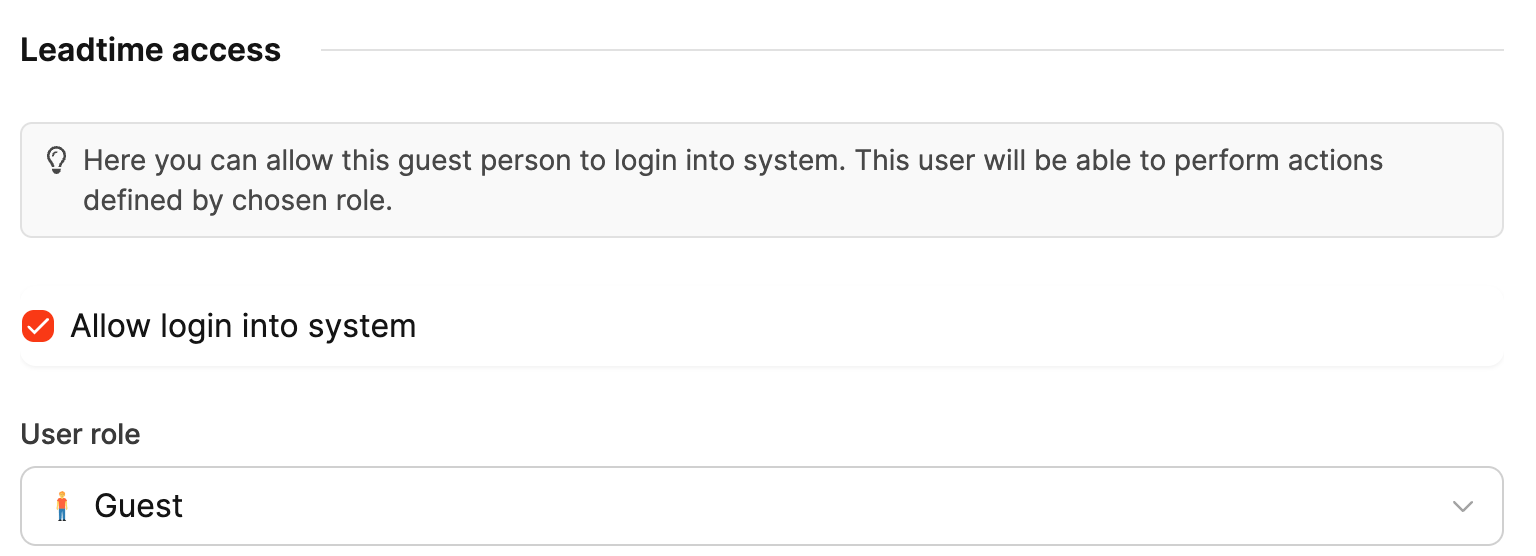
2. Allow access to the system
- Enable Allow access to the system.
- Under User role, select the Guest role.
3. Send the invitation
- Save the record.
- In a workspace that has finished setup, the guest receives an invitation email with a secure link.
- If the workspace is still being set up, Leadtime sends the invitation when setup is complete.
4. First sign-in
- The guest opens the invitation link and sets their password.
- Leadtime then signs them in and shows only the projects and tasks shared with their organization.
Guest user permissions and restrictions
- Access only to projects belonging to their own organization that have Guest access enabled
- Within those projects, access only to tasks that are marked as available to guests
- No access to internal projects or internal communication
- On Projects, guests see the tabs that match their permissions (typically All projects, Favorites, Single, Continuous, and Archived projects). Staff-only tabs such as Internal projects and value-group views stay hidden, along with organization, guest-access, and value-group columns and filters. Single and continuous lists drop the word “external,” because guests do not see internal work
- Guests use a compact top navigation instead of the staff side menu. The links in it follow the guest’s role permissions
- Projects in that nav is still a link to the projects list. Hover (or the mobile menu) also lists the projects the guest can open
- Home gives every guest the same clear starting page. It explains Leadtime and shows cards for shared projects, guest-visible tasks, assigned forms, and project documentation. If no project is shared, it shows who the guest can contact
- Guests cannot create or change dashboards. Workspace users keep the configurable dashboard system
- The built-in Guest role cannot open the Agents page, the agent panel, or agent chats. A custom guest role can include Chat with agents if those guests should use them
Guests can view project documentation in every project they can access. They cannot change pages unless the guest role includes Manage project documentation. Depending on the selected guest role, they can also create tasks, comment, fill assigned forms, review logged time, accept or reject express quotations, and use guest-scoped Big Picture and Objects views.
No access to:
- Billing
- Other employees’ time tracking
- Organizations, contacts, project journals, or employee data
- Workspace, role, automation, agent, OAuth, API, MCP, or access-token administration
Guest roles are fail closed: only collaboration permissions reviewed for guest data scoping can be assigned. A normal parent role or a newly added permission cannot extend a guest role beyond that boundary.
Project documentation is an extra ceiling. Organization members see only pages allowed by the organization default, the project override, and page visibility. See Guest access and Project guest access.
Check guest access as a manager
If you have the Log in as organization members permission, you can open a real guest session from a member detail page. Use this to confirm what a guest can see before you invite customers or partners.
- Open Organizations, select the organization, then open the member.
- Open the overflow menu and choose Log in as member.
- Leadtime signs you in as that guest and opens Home. An alert tells you who you are logged in as and how to switch back.
- Check roles, project visibility, and guest-only behavior.
- When you are done, open the account menu in the top bar and switch back to your own user.
Actions taken while logged in as the guest are real and recorded in the journal.
You can also copy the login link from that menu if you need the session in another browser. Your current session stays active.
Guest logo for an organization
Open Organizations → the organization → Settings → Guest access to upload a custom logo. Members of that organization see this logo in the guest header after they sign in, instead of the Leadtime or workspace logo.
On the same page you can brand the Home welcome banner (default message, custom message, or custom image) and set an optional guest accent color. A guest’s personal color still has priority. Otherwise Leadtime uses the organization color, then the workspace color.