
VAT
In this area you can make adjustments to the VAT rate used by the system
Value Added Tax (VAT)
Found under Administration → Workspace Settings → VAT
In this section, you define which VAT rate is used in your workspace. This setting ensures that invoices and proposals are calculated automatically using the correct tax rate.
Validity periods
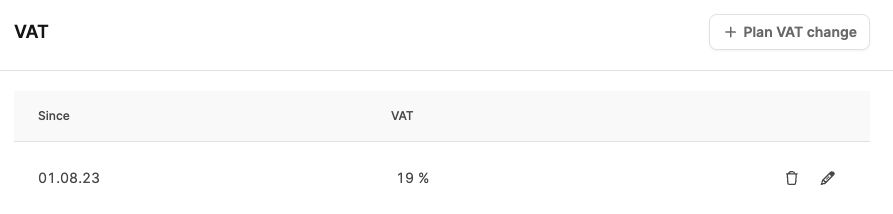
Because VAT rates can change by law, Leadtime lets you create multiple VAT periods.
This allows the system to recognize automatically the date from which a new rate should apply.
The overview shows all stored periods with their start date (“Since”) and the corresponding tax rate.
Example:
- 08/01/2023 – 19%
- from 10/19/2025 – 17% (newly scheduled)
As soon as the new date is reached, the new rate is applied automatically to all invoices and proposals created from that point onward.
Documents already issued retain their original VAT rate.
Schedule a new VAT change
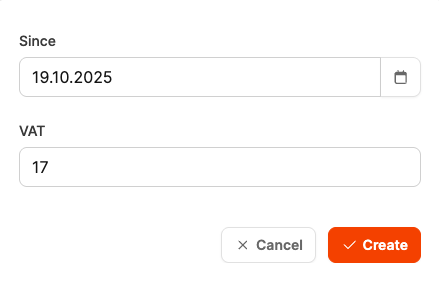
To create a new period:
- Open Administration → Workspace Settings → VAT.
- Click Plan VAT change.
- Select the start date from which the new rate should apply.
- Enter the new percentage.
- Click Create to save the change.
The new VAT rate is added to the overview and becomes active automatically when the start date is reached.
This keeps your invoicing up to date and legally compliant at all times—even when future tax changes are planned.