
Invoicing Manual Items
Manual positions enable the billing of external costs and flat rates outside of the automatic system logic.
You’ll find this area in Leadtime under Billing → Invoice verification when you open a pending invoice.
Manual items are used to bill costs that do not arise automatically from tickets, products or subscriptions.
They are suitable for third-party costs, external expenses, subsequent flat rates or corrections to existing quotes.
This means you can also record services that arose outside the operational project structure.
How it works

In invoice verification, you can add extra manual entries below the automatically recorded items.
These lines are treated like regular invoice items and are fully integrated into tax and total calculations.
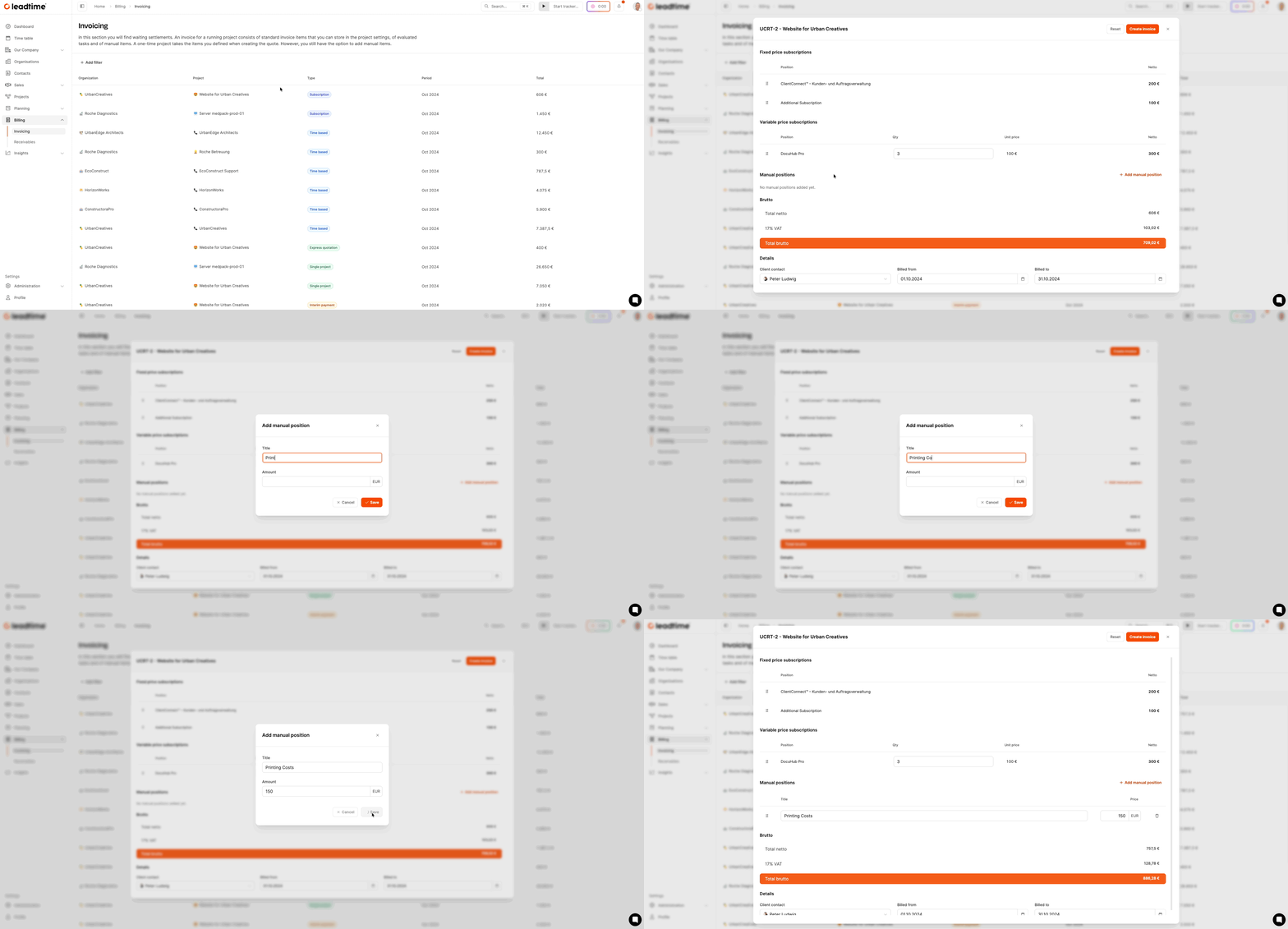
To add a manual item:
- Open Billing > Invoice verification
- Select the relevant draft invoice
- Scroll to the Manual items section
- Click + Add manual item
The following fields are available:
- Title: Name of the service (e.g. “Travel expenses workshop”)
- Amount: Net price in euros
Typical use cases:
- Recharging external services (e.g. translation, license costs)
- Travel costs or other expenses
- One-off flat rates without a ticket reference
- Addendum items that were missing from the original quote
Once added, the item appears directly in the preview of the draft invoice and can be edited or removed at any time before billing.
Note: Manual items are billed definitively during the release process and can no longer be changed afterwards.