
Assigning Tasks to the Team (Workshop Part 13)
Plan tickets based on real capacities, identify bottlenecks early and reliably manage deadlines during the course of the project.
As soon as concrete tasks (tickets) have been created from the work packages of a project, the question arises: Who should do what and when? Capacity planning ensures that tasks are distributed sensibly among the available employees - taking into account:
- other ongoing projects
- existing customer inquiries
- internal tasks
- Absences (vacation, illness)
Digital service providers in particular rarely work exclusively on one project. This makes it all the more important to have realistic planning that avoids overload and makes bottlenecks visible at an early stage.
You can find the pipeline in Leadtime in the respective project under the tab pipeline. Here you plan the tickets created in the project based on the available resources. The aim is to distribute tasks sensibly over time, make bottlenecks visible and ensure realistic delivery capability.
Pipeline planning
To the area pipeline
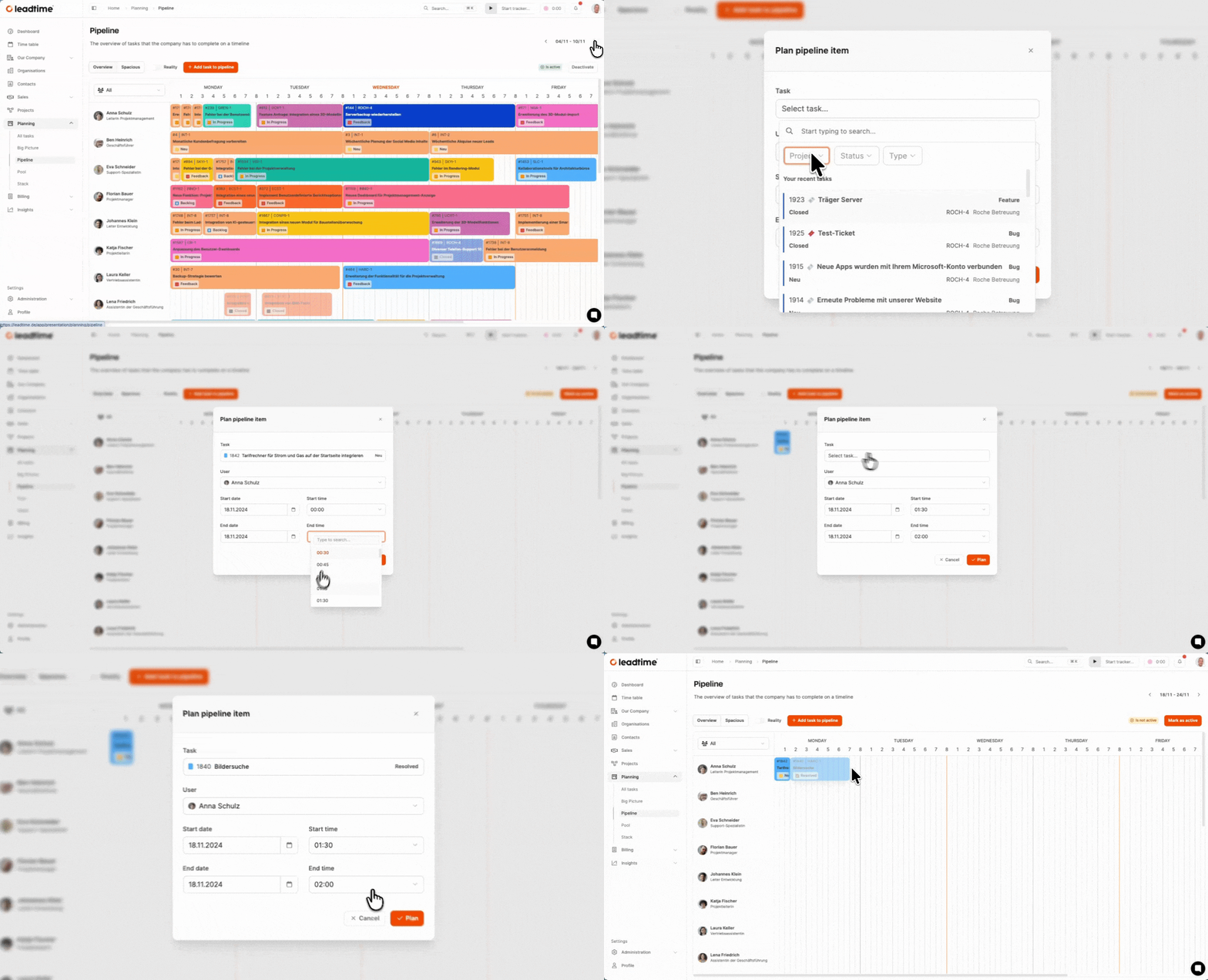
After the work packages have been converted into tickets in the workshop, operational resource planning takes place at this point.
The pipeline shows a weekly overview of which team members have already been assigned which tickets. The planning is done resource based, which means: Only available times can be occupied.
In the workshop we use a predefined project team for the Web4Coach project. This means you only see people in the pipeline who are actually involved in the implementation.
Schedule tasks
To schedule a ticket in the project:
- Click on “Add task to pipeline”.
- Select the project ticket you want.
- Identify the responsible person.
- Define start and end dates as well as start and end times.
- Confirm with “Plan”.
The pipeline automatically takes into account:
- weekends
- Absences (e.g. vacation)
- blocked times
This enables a realistic simulation of resource requirements in the workshop.
Iterative approach
Tickets will be purchased as part of the workshop not completely planned, but in sections. Example:
A ticket covers 8 hours of effort. We initially plan 4 hours and then carry out a review. Then we plan the next 4 hours.
In this way, planning remains flexible and responsive.
Team based view
The pipeline can display the following areas:
- entire company
- a specific team (in the workshop: “Team Web4Coach”)
For our scenario, we only filter the workshop team to keep an overview.
Comparison to Gantt planning
In the workshop you become aware none Classic Gantt planning is used because it represents idealized time periods. The pipeline, on the other hand, shows:
- actual capacities
- recognizable bottlenecks
- realistic deadline scenarios
For part 14 of the workshop: Acceptance tests and integrated test case management (workshop part 14)